
Sales Flow
Overview
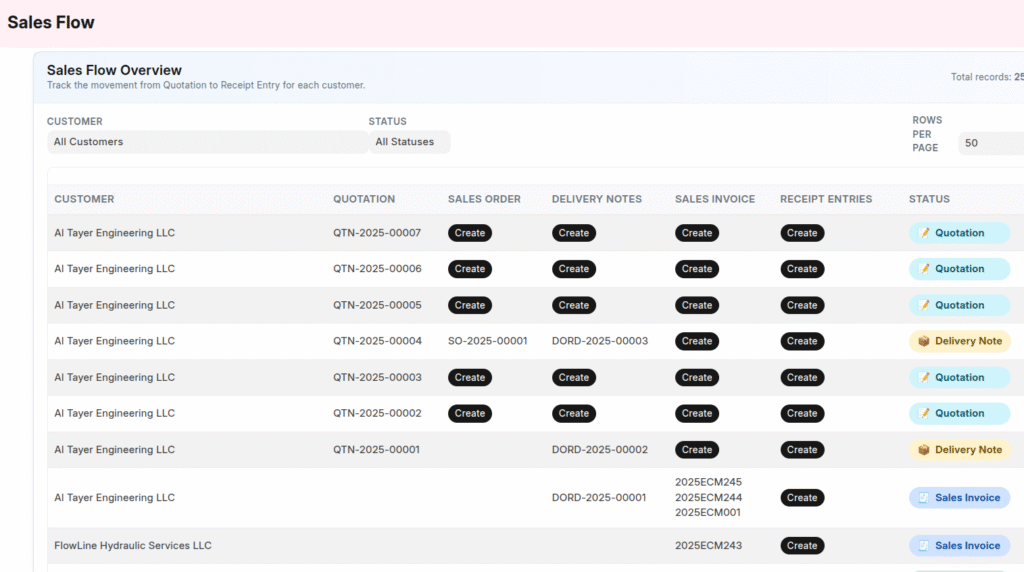
The Sales Flow dashboard in DIGITZ ERP provides a complete end-to-end visualisation of how each customer transaction progresses through the sales cycle.
It brings all related documents—Quotation, Sales Order, Delivery Note, Sales Invoice, and Receipt Entry—into a single, easy-to-navigate screen.
This allows organisations to:
- Track the progress of every transaction
- Identify pending stages instantly
- Create the next document without searching
- View all completed stages with direct links
- Maintain a clean and organised sales workflow
The overview serves as a central control panel for monitoring and completing the entire sales process efficiently.
Purpose of the Sales Flow
Managing multi-stage sales workflows requires visibility and control. Any missing or delayed stage may impact delivery, invoicing, and cash flow.
The Sales Flow dashboard supports organisations by providing:
| What it provides | Why it matters |
|---|---|
| Full visibility across stages | Avoids missing documents |
| Clear indication of pending steps | Helps the sales team act quickly |
| One-click creation of next step | Saves time and prevents errors |
| Backward tracking of completed stages | Useful for clarifications and audits |
Standard Sales Workflow Covered
The dashboard reflects the most commonly followed business flow:
Quotation → Sales Order → Delivery Note → Sales Invoice → Receipt Entry
- Created stages appear as clickable links.
- Missing stages show a Create button.
- Ensures continuous and complete workflow progression.
Understanding the Sales Flow Columns
Each row represents a sales transaction.
| Column | Description |
|---|---|
| Customer | Customer associated with the flow |
| Quotation | Link or option to create |
| Sales Order | Link(s) or option to create |
| Delivery Notes | Link(s) or option to create |
| Sales Invoice | Link(s) or option to create |
| Receipt Entries | Link(s) or option to create |
| Status | Current progress in the workflow |
Instant Creation of the Next Step
DIGITZ ERP automatically identifies the next pending stage and shows a single action button.
| Progress so far | Button shown |
|---|---|
| Quotation created | Create Sales Order |
| Sales Order created | Create Delivery Note |
| Delivery Note created | Create Sales Invoice |
| Sales Invoice created | Create Receipt Entry |
| Receipt Entry created | No further action |
This ensures the sales cycle is completed without missing or skipping important stages.
Backward Tracking
All completed documents appear as clickable links such as:
- Quotation
- Sales Order
- Delivery Note
- Sales Invoice
- Receipt Entry
Users can instantly trace the flow back to any previous document.
Status Display
The final column summarises the progress of each transaction:
| Status | Meaning |
|---|---|
| Pending | No documents created yet |
| Quotation | Quotation completed |
| Sales Order | Sales Order completed |
| Delivery Note | Delivery Note completed |
| Sales Invoice | Invoice generated |
| Receipt Entry | Payment recorded |
| Completed | All stages completed |
Filters and Pagination
The dashboard includes filters and navigation controls to manage large volumes of data:
| Feature | Purpose |
|---|---|
| Customer Filter | Filter transactions by customer |
| Status Filter | Filter by workflow stage |
| Rows per Page | Choose 25 / 50 / 100 / 500 / 2000 |
| Pagination | Navigate through multiple pages |
Benefits
| Advantage | Impact |
|---|---|
| Full visibility of sales cycle | Eliminates document leakage |
| Pending stage identification | Helps users act immediately |
| One-click next document | Faster workflow and reduced manual steps |
| Backward traceability | Helpful during customer queries & audits |
| Clean, professional interface | Improves usability |
Conclusion
The Sales Flow dashboard in DIGITZ ERP provides an intuitive and powerful way to track and complete the entire sales cycle.
By ensuring every transaction moves smoothly from Quotation to Payment, it enhances operational efficiency, improves follow-up, and supports timely decision-making at all levels.
Leave a Reply